


Category Ajax Filter Pro

4.9 

 WordPress
 Custom Post Types
 Woocommerce
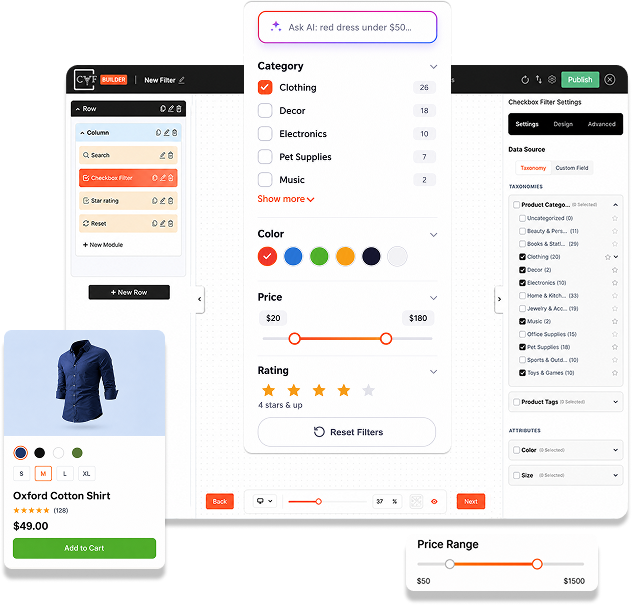


AJAX-Powered Filtering
Visitors filter by category, tag, attribute, or price and see results instantly — no page reloads, no waiting, on any device.

Drag & Drop Filter Builder
Build your filter, design each post or product card, and customize the layout in 3 visual steps. Every module is styleable — no coding.

Works with Any Post Type
Filter blog posts, custom post types, and WooCommerce products using any taxonomy, brand, attribute, or custom field. Display anywhere with a shortcode.

Pre-built Template Library
Start from ready-made layouts, filters, and post card templates — import one from the built-in library in seconds, then make it yours.
CAF Features
Unlock advanced filtering capabilities with powerful Pro features. Get game-changing tools to create smarter filters, deeper analytics, and complete design control. Transform your filtering experience.


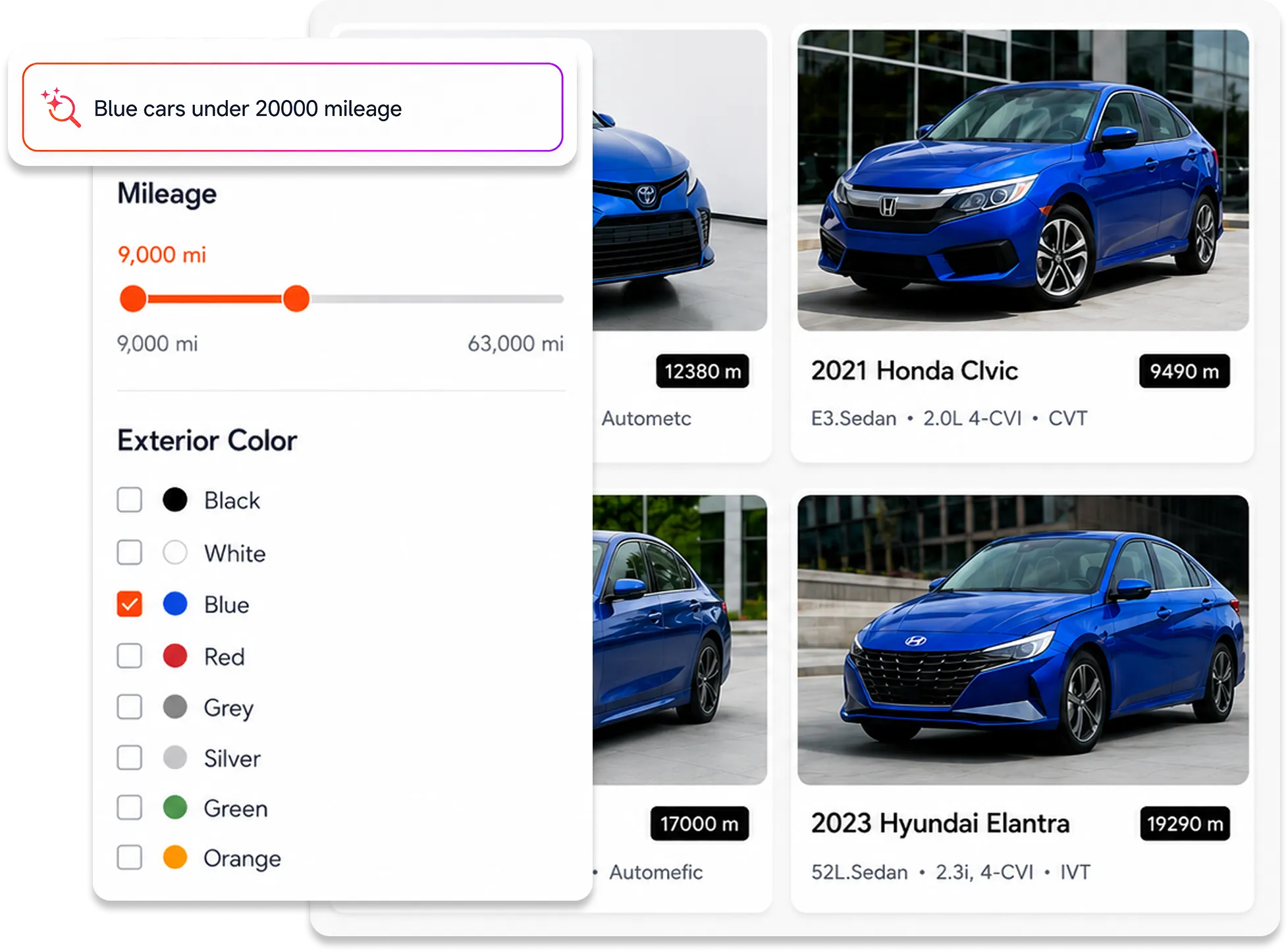
Ai Search
Semantic, intent-based search that understands what visitors are looking for. Instead of matching exact keywords, AI Search matches visitor intent against your post content, taxonomy terms, and labels. Visitors find what they actually need, not just what they typed. Higher relevance means more engagement and conversions.
Key Benefits
- Understand what visitors mean, not just their words
- Smarter results across posts, categories, and custom fields
- Fewer frustrated visitors, more conversions
- Works automatically, no manual optimization needed
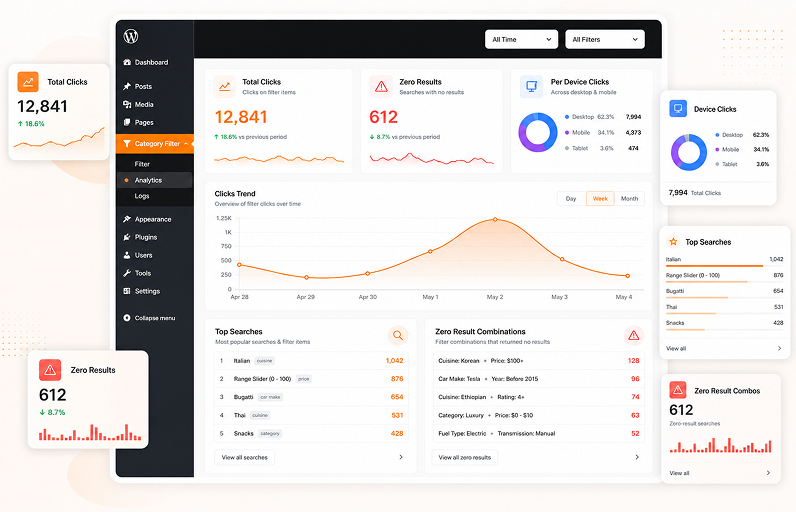
Analytics
Voice Search


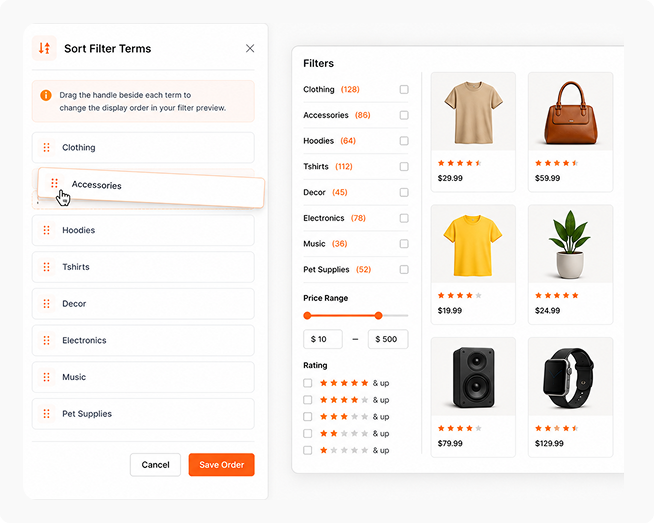
Sort Filter Terms/Categories
Manually reorder filter terms using drag-and-drop instead of relying on alphabetical or default ordering. Prioritize the categories, taxonomies, or custom field terms that matter most to your visitors. Works with Checkbox and Dropdown filters. Control the exact order visitors see, guiding them toward the most relevant options and boosting engagement with your most important categories.
Key Benefits
- Drag-and-drop reordering of filter terms
- Works with Checkbox and Dropdown filters
Responsive Design
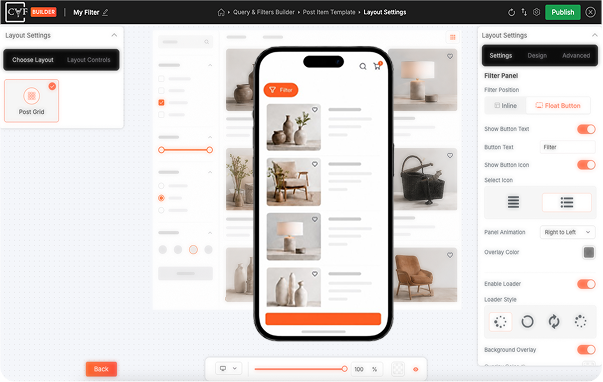
Create filters and layouts that adapt perfectly to every device. Desktop displays your full sidebar layout. Mobile and tablet automatically optimize with hiding, custom panels, appearance, animations, and behavior. Every element like filter positions, spacing, column layouts, and card layouts can be configured, delivering the perfect experience across all screens.
Prefix & Suffix Options
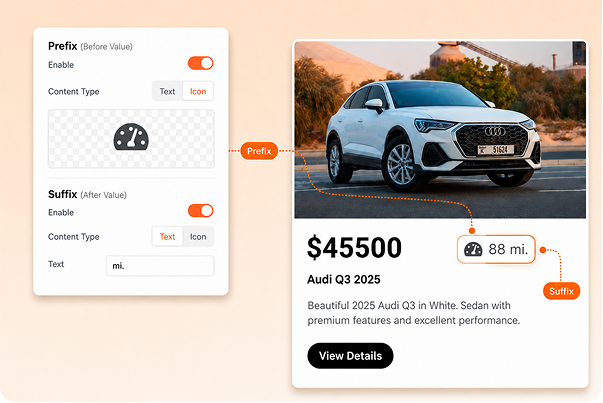
Add custom text or icons before and after any post data. Works across all post modules like author, date, comment count, custom fields, and more. Add units such as currency symbols, labels, and prefixes. Complete control over how every piece of information displays. Present your content with branded labels, helpful details, and visual hierarchy without extra code.
Advance Layout Controls
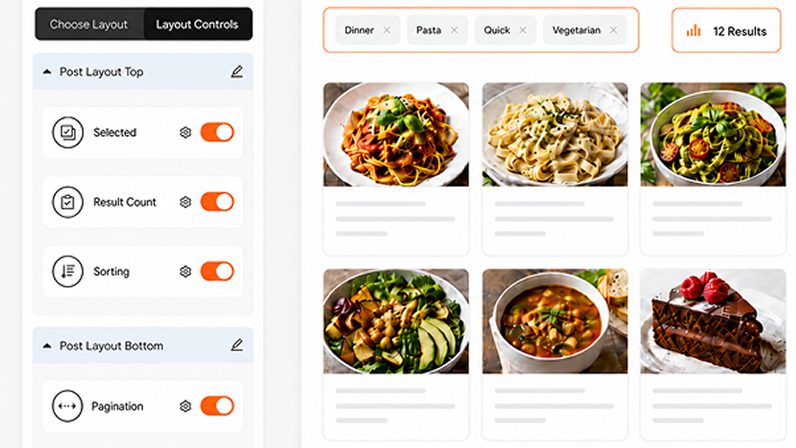
Place pagination, sorting dropdowns, result counts, and selected filters exactly where you want them. Choose from four toolbar positions above filters, below filters, above post grid, or below post grid. Fully customize colors, fonts, spacing, positioning, drag-and-drop layout, and responsive behavior. Stack multiple modules in the same position. Complete layout and design control without any code.
SEO Controls
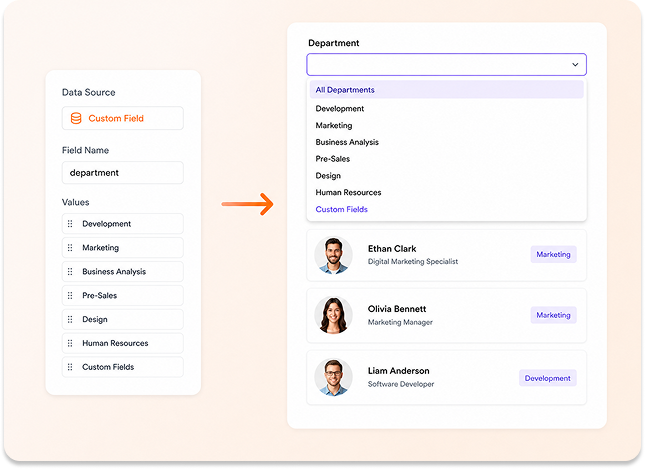
Custom Fields in Filters
Key Benefits
- Create Checkbox and Dropdown filters from any custom field values
- Let Search target specific custom fields for focused results
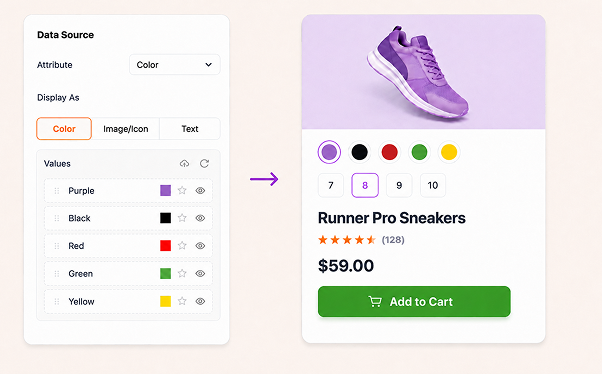
Product Swatches
Display product attributes as selectable swatches directly on product cards. Choose between text, color, or image styles. Shoppers pick their size or color and add the exact variation to cart without opening the product page. Every swatch is fully styleable to match your design. Turn your filtered grid into a fast, one-stop shopping experience.
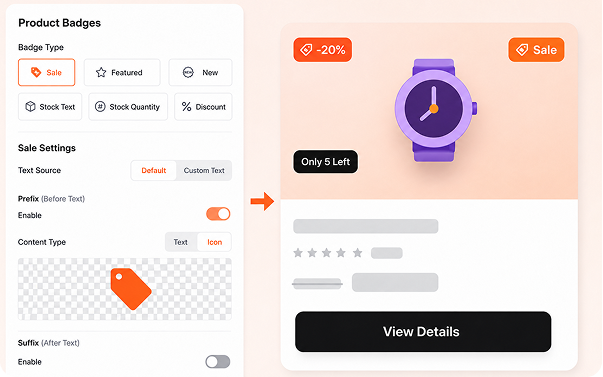
Smart Product Badges
Go beyond the standard Sale badge. Create New, Best Seller, stock status, stock quantity, and discount badges with value or percentage display. Each badge comes with its own conditional logic. Set a Low Stock Threshold to trigger urgency automatically. Combine options to build flexible badges that appear exactly when they should, no manual tagging required.
Explore Live Demos
Why Upgrade to Pro?

Features
-
Custom Post Types
 Create and manage multiple custom post types easily.
-
Pre-Built Layouts
Choose from several ready made layouts for displaying posts.
-
Custom Taxonomy (Single)
Create filters using a single taxonomy.
-
Enable/Disable Filter
Turn filters on or off easily from plugin settings.
-
Posts/Filter Color Combination
Customize color combinations for posts and filters.
-
Default Sorting
Set default sorting order for posts.
-
Multiple Taxonomies For Filter
Use multiple taxonomies to create advanced filters.
-
Analytics Feature
Track filter usage and user interaction analytics.
-
Elementor Loop Builder Support
Fully compatible with Elementor Loop Builder.
-
Voice Search
Search posts using voice commands.
-
Pagination
Load more posts using pagination.
-
Google Fonts
Use Google Fonts for better typography.
-
Font Awesome Icons
Access Font Awesome icon library.
-
Sorting Dropdowns On Frontend
Users can sort posts from frontend dropdowns.
-
Active Filters On Frontend
Display active filters on frontend.
-
Icons For Filter Terms And Categories (In Filters)
Assign icons to filter categories.
-
Translate Default Strings
Translate plugin default strings easily.
-
Default Terms (Category) On Page Load
Show default category when page loads.
-
Hide Or Show Meta Elements (Date, Author, Comment Count Etc.)
Control visibility of post meta elements.
-
On Demand Layout
Load layouts dynamically when required.
-
Scroll To Results Container On Filter Click
Automatically scroll to results on filter click.
-
Custom WP Query Support
Supports custom WordPress queries.
-
Priority Support
Get priority technical support.
Free Version
- 5+
- Basic
Pro Version
- 15+
- Advanced
Get Category AJAX Filter Pro Today
Pick the license that fits your needs. All plans include updates, support, and powerful features to enhance your WordPress website.
Annual Plan
Single Domain
Plugin Price
- CAF Builder
- 1 Year Plugin Updates
- 1 Year Premium Support
Lifetime Plan
Up to 25 Domains
Plugin Price
- CAF Builder
- Lifetime Plugin Updates
- Premium Support
100% Risk-Free Money Back Guarantee

Back Guarantee

What Website Owners and WordPress Experts Say
Our users love sharing their experiences! Thousands of website owners and WordPress professionals have tried our free and pro plugins, and their feedback helps us grow and improve every day.

John Doe

Really useful plugin and the pro version is well worth buying. Installing it helped me a lot on quite a complex, large Divi site. Support are excellent too – highly recommended!

Emily Smith
They released an update as I was implementing it, added some nice sorting functionality. Needs a bit of code insertion for custom sorting. Free version works well.

Michael Johnson
I would like to say how impressed with the support I received from Trusty Plugins. I got feedback spontaneously and replies were prompt. Plus, my issues were resolved in no time.

Sarah Anderson
This plugin is AWESOME! Exactly what I was looking for. Without loading the page you can filter the post by category and the Customer Support is EXCELLENT. Other developers don’t help much.
John Doe
Really useful plugin and the pro version is well worth buying. Installing it helped me a lot on quite a complex, large Divi site. Support are excellent too – highly recommended!
Emily Smith
They released an update as I was implementing it, added some nice sorting functionality. Needs a bit of code insertion for custom sorting. Free version works well.
Michael Johnson
I would like to say how impressed with the support I received from Trusty Plugins. I got feedback spontaneously and replies were prompt. Plus, my issues were resolved in no time.
Sarah Anderson
This plugin is AWESOME! Exactly what I was looking for. Without loading the page you can filter the post by category and the Customer Support is EXCELLENT. Other developers don’t help much.
Frequently Asked Questions
Q. What is Category AJAX Filter (CAF) Pro?
Category AJAX Filter Pro is a WordPress plugin that allows visitors to filter posts and custom post types using categories and taxonomies, helping users quickly find relevant content.
Q. Can I filter posts using multiple taxonomies?
Yes. The plugin supports filtering with multiple taxonomies, so visitors can combine filters like categories, tags, or custom taxonomies to narrow down results.
Q. Does the plugin work with page builders like Elementor or Divi?
Yes. Category AJAX Filter Pro is compatible with popular page builders such as Elementor, Divi, Gutenberg, and others.
Q. Can I customize filter layouts and post layouts?
Yes. The plugin includes multiple pre-built layouts and you can also customise layouts using template file and very soon we are going to launch CAF builder where you will be able to create your desired Filters and Layouts.
Q. Will the plugin work with my existing WordPress theme?
Yes. The plugin is designed to work with most well-coded WordPress themes without requiring additional configuration.
Q. Do I receive updates after purchasing the plugin?
Yes. All Pro licenses include plugin updates and access to support during the active license period.
Q. Is Category AJAX Filter Pro easy to set up?
Yes. The plugin includes pre-built layouts and simple settings, allowing you to create filters and display posts without complex configuration.
Q. What makes the Pro version different from the Free version?
The Pro version includes advanced filter layouts, additional post layouts, analytics features, search filters, and more customization options compared to the Free version.
Q. What if the plugin does not work for my website?
We offer a 7-day money-back guarantee. If the plugin does not meet your needs, you can request a refund within 7 days of purchase.